
Closest to the K40 Pro
OMTech K40+ 45W
LightBurn and LaserGRBL support with air assist built in
- Complete desktop CO2 laser
- 45W CO2 tube
- Fits the K40
The Monport K40 Pro CO2 40W laser engraver & cutter fixed the stock K40's worst shortcuts at the factory. Its successors do the same job with LightBurn and air assist from the box.
Current as of September 2026The Monport K40 Pro is in short supply new in September 2026, and the brand's newer machines are larger CO2 and fiber lasers. The K40-class machines on sale now are the OMTech K40+ 45W and a VEVOR 45W desktop, and both support LightBurn.


Monport built its 40W desktop CO2 laser as the K40 Pro. The idea was simple: the familiar 300 x 200mm K40 layout, but with LightBurn support and air assist fitted at the factory instead of bolted on by the owner.
The idea still makes sense. New units are scarce in September 2026, and no other Monport model fills the K40 class.
Monport's newer machines are larger CO2 and fiber lasers. Those are a different size and budget from a 40W desktop. If the 40W Pro is what you wanted, you have three honest routes:
A used Monport can also be a fair buy, as long as the tube, optics and water loop pass a few simple checks before money changes hands.
|
OMTech K40+ 45W |
VEVOR 45W Desktop CO2 Laser (K40-class) |
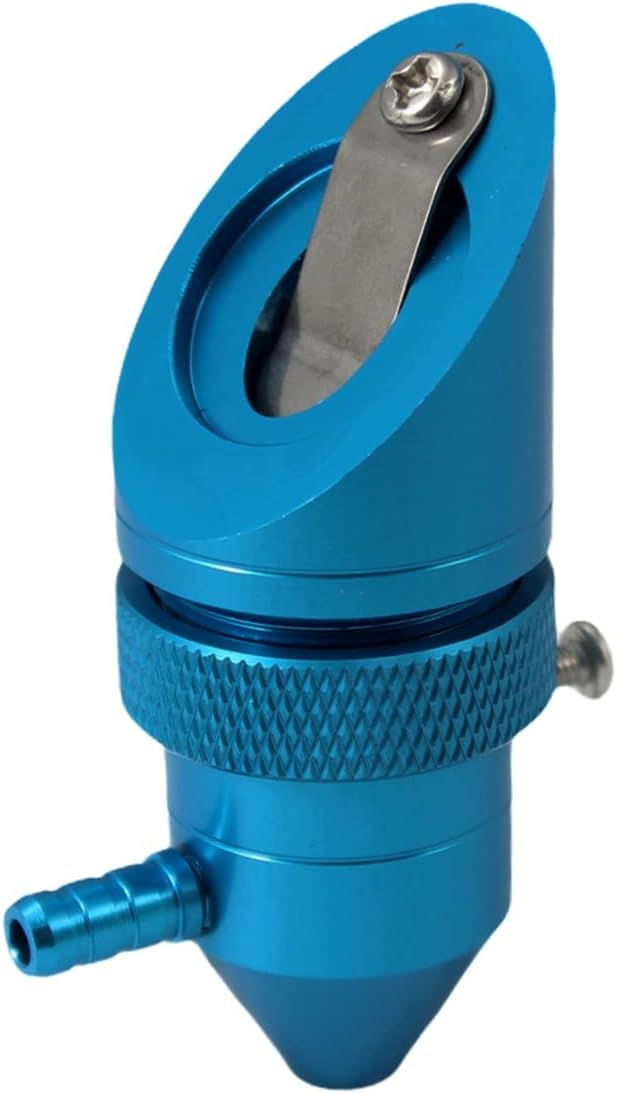 Lightobject K40 Air-Assist Head
 | |
| Type | Machine | Machine | Laser head |
| Power | 45W | 45W | — |
| Size | — | — | 12mm |
| Air assist | — | Yes | Yes |
| Fits K40 | Yes | Check size | Yes |
| View offer | View offer | View offer |
For most people shopping for a Monport K40, LightBurn is the whole point. The stock K40 ships with an M2 Nano board that LightBurn does not drive, so owners are stuck with CorelLaser or the free K40 Whisperer.
LightBurn talks to GRBL-type controllers and several dedicated laser controllers. That is why a machine's board matters more than its paint job. First thing to hunt for in the spec: the controller's name or a plain statement of LightBurn support.
Here is how the current options line up:
LightBurn is paid software with a free trial. Run the trial on your own machine before you buy a licence, and check the device setup screen finds your controller.
K40 Whisperer stays useful even after an upgrade decision. It is free, it runs the stock board well for cutting and simple engraving, and it lets you learn the machine before spending anything. All four K40 software options compare side by side on setup and limits.
Strip the Monport K40 Pro down and you get a short list of fixes. Each one answers a known weakness of the stock K40, so it works as a buying checklist for any replacement.
| Fix the Pro promised | Why it matters | Where to get it now |
|---|---|---|
| LightBurn support | Layers, cut order, proper image engraving | K40+, VEVOR, or a GRBL board |
| Air assist | Cleaner cuts, fewer flare-ups, a cleaner lens | Built into both machines |
| Usable bed | The stock clamp plate suits little besides rubber stamps | Honeycomb beds sized for the K40 |
| Readable controls | Knowing the power you are running | Digital panels on newer machines |
Both current machines cover the first two rows from the box. Beds and panels vary, so check each machine's spec for the details you care about most.
Things no badge fixes:
Those jobs come with every CO2 laser, whatever name is on the lid. A new machine also arrives with its mirrors knocked slightly out of line by the trip, so plan an alignment check before the first real job. All three belong in a proper K40 setup and safety routine before the first cut.
This GRBL controller uses the same 97 x 64mm footprint and hole layout as the M2 Nano board, so it bolts in without drilling. It adds PWM grayscale, lid and water protection inputs, and LightBurn support.
View offerIf a blue-box K40 already sits on your bench, you can match most of the Monport K40 Pro's features for part of the cost of a new machine. Fit the parts in the order that pays back fastest.
Budget time as well as money. A controller swap is an evening's work if the wiring matches, and longer if your unit uses a different connector layout. Check the board's pinout against your own before ordering. Keep the old M2 Nano in a drawer as a fallback.
Follow the full K40 upgrade order, with a part for every step, and a stock machine ends up close to the Pro's spec sheet.
| Stock blue-box K40 | OMTech K40+ 45W | VEVOR 45W desktop | |
|---|---|---|---|
| Tube | Nominal 40W | 45W | 45W |
| Work area | About 300 x 200mm | 12 x 8 in | 12 x 8 in |
| Air assist | Missing on most units | Built in, 45° nozzle | Built in |
| Software | CorelLaser or K40 Whisperer | LightBurn, LaserGRBL | LightBurn, GRBL, CorelDRAW |
| Round objects | Rewire the Y axis to a rotary | Rotary sold as a bundle | Rotary axis included |
| Maker's rated cut | None given | 10mm acrylic, 8mm wood | Up to 5mm acrylic, 3mm wood recommended |
From OMTech's and VEVOR's published specs, September 2026. The stock column describes the generic blue-and-white K40 most owners started on. Cutting figures are the makers' own ratings, not measurements.
Used Monport K40 Pro units do turn up for sale. Treat one like any secondhand CO2 laser: the tube and the optics are consumables, and a clean case says nothing about either.
Ask to see the machine cut, not just power on. An owner who will not fire it has told you something.
Cut a test piece of 3mm plywood at the owner's usual settings. If it goes through cleanly in one pass, the tube, alignment and focus are in decent shape.
If the tube is tired, price in a replacement before you offer. A 700mm tube fits the K40 bay without modification; K40 tube and power supply sizes and safe current are worth checking first.
Scarce new as of September 2026. The OMTech K40+ 45W and a VEVOR 45W desktop are the K40-class machines on sale.
LightBurn support was one of its main selling points. If you buy one used, confirm the controller shows up in LightBurn's device setup before you pay.
The OMTech K40+ 45W: same bed size, built-in air assist and listed LightBurn support. The VEVOR 45W adds a rotary axis in the box.
Not with the stock M2 Nano board. Swap in a GRBL controller that fits the same mounting holes, then add the machine in LightBurn as a GRBL device.
It used the K40 format of a 40W tube and a roughly 300 x 200mm bed, with upgrades fitted at the factory. The core layout and the safety rules are the same.


